How the shell draws
ztMETRO is the shell and the Wayland compositor in one. Every frame it draws the whole screen in one GLES2 pass, layer by layer, bottom to top, in a fixed order. Your app is one of those layers. Below, layer 01 is in front, because it is painted first, and each later layer stands further back.
Scroll, and the frame comes apart into its layers
The picture
The same layers as one picture, with what they mean. Open it for the full size.
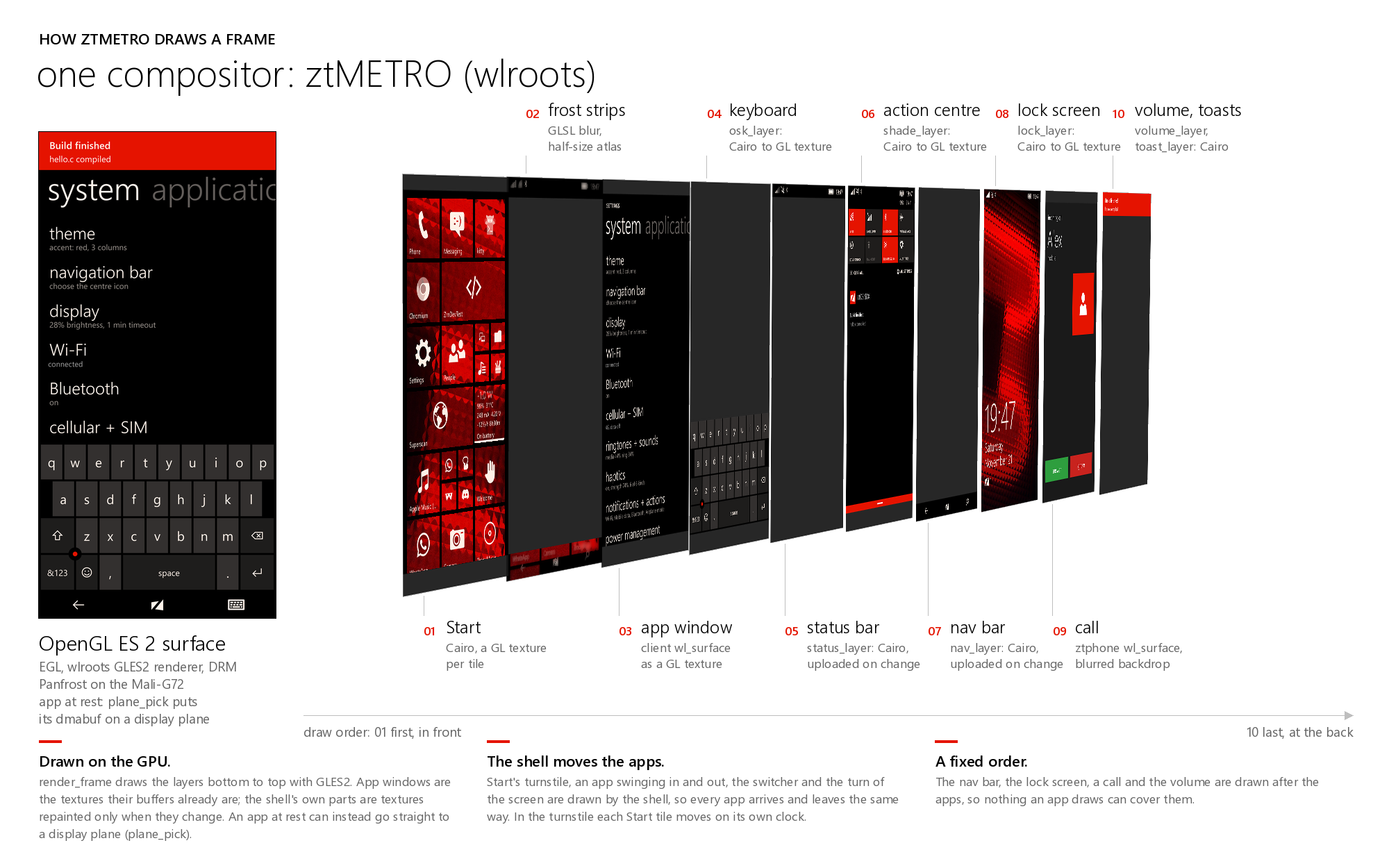
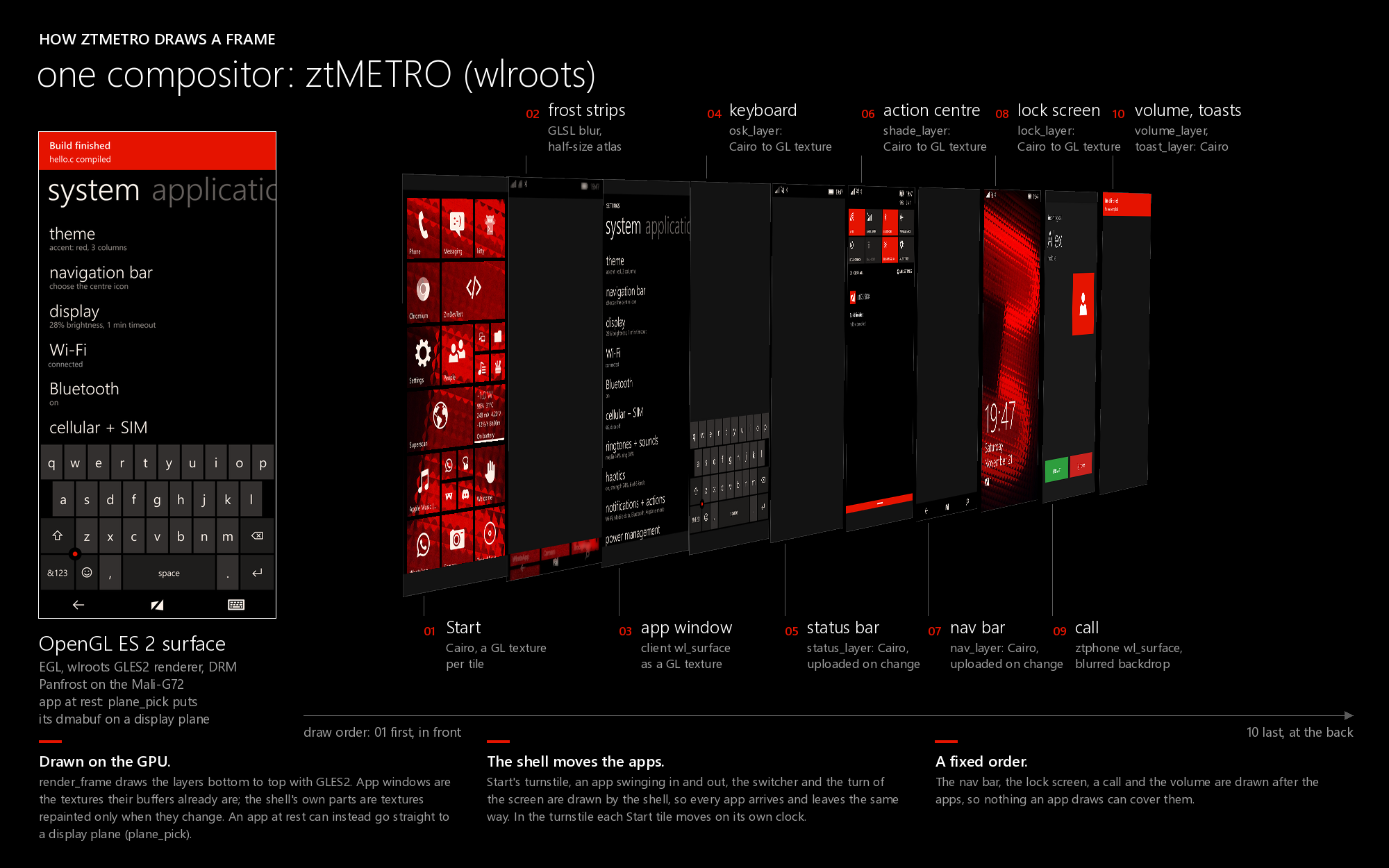
The layers are screenshots of ztMETRO on a Galaxy S9, cut apart along the shell's own lines (status bar 28 points, nav bar 40). Wi-Fi network and carrier names are covered, and the notification in the action centre is replaced with a demo one. The call screen is not a capture: it is drawn with zrnui by gen/layers.c, because we do not place a real call for a picture. The order and the names come from render_frame in ztmetro/ztmetro.c (ztOSMobile, read on 21 November 2026).
Apart and back
The frame you see comes apart into its ten layers and folds back. Start is built from its tiles, each its own texture in the shell, laid in their places. The clip starts with every layer stacked flat, 01 in front.
The order, bottom to top
This is the order render_frame draws in; a later layer covers an earlier one. The numbers are the picture's; a dash marks a step that is not in it.
| # | Layer | What the shell draws | In the code |
|---|---|---|---|
| – | Background | The screen is cleared to the shell background (white in Light, black in Dark). Only the gaps between Start's tiles show it | glClear, shell_bg_color |
| 01 | Start and the app list | The tiles, each its own texture, and the list beside them. In the turnstile each tile moves on its own clock. Not drawn at all while an app at rest or the lock screen covers them | tiles, items; skipped when app_covers or lock_covers |
| 02 | Frost strips | What of Start and the list passes under the status bar and the nav bar, blurred into two strips right after Start is drawn, and blurred again only when what is under them changes. Each strip is laid on the screen just under its own bar (step 05 and 07), as the bar's backing. Over an app the bars are opaque and there is no frost | frost_prepare, frost[0], frost[1] |
| 03 | App window | Your window, between the bars. The app's buffer is already a GPU texture; the shell draws it as a quad. Or the switcher's cards, or the launch flip in landscape | draw_app_surface, wlr_surface_get_texture |
| – | Hyperscan | The shell's search page, when it is up (not in the picture) | hyper_layer |
| 04 | Keyboard | The on-screen keyboard, sliding up from the nav bar | osk_layer |
| – | The turn | While the screen rotates, a picture of the old layout over the new one (not in the picture) | rot_snapshot_draw |
| 05 | Status bar | Signal, battery, clock; the charging plug and the taller row you get by holding it | status_layer, plug_layer, peek_layer |
| 06 | Action centre | The panel pulled down from the top: quick actions and notifications | shade_layer |
| 07 | Nav bar | Back, Start, search. Drawn after the action centre, so the panel comes down behind it | nav_layer |
| 08 | Lock screen | Its picture, clock and notification row. Opaque: while it is fully down, Start and the apps under it are not drawn, and while it slides only the strip below it is | lock_layer, lock_clock_layer |
| 09 | Call | The phone app's window (ztphone) drawn again here, over the lock, with the status row over it | call_over_lock |
| 10 | Volume, toasts, dialogs | The volume banner and a notification toast in the same place at the top, and the shell's dialogs | volume_layer, toast_layer, dialog_layer |
The boot splash is left out too. One exception to "one pass": when your app is at rest and fills its area, the shell may put its buffer straight on a display plane (plane_pick) instead of drawing it, if the display hardware accepts it.
Textures and what is drawn each frame
- App windows are textures already: the shell gets your buffer from Wayland and draws it, it does not copy it.
- The shell's own layers (the bars, the keyboard, the action centre, the lock screen, the banners, each tile) are painted once into a texture and uploaded again only when what they show changes.
- Each frame the shell only places those textures: a quad each, with the position, turn and fade of the moment. The frost strips are blurred on the GPU only when what is under the bars has changed (every frame only during the turn); the call's frosted backdrop is the other blur.
The shell moves the apps
Because every app is a layer of the same frame, the shell, not the app, animates going between them: Start's tiles turning away and an app swinging in (the turnstile), an app swinging out on Back, the switcher's cards, the launch flip in landscape, and the turn of the screen. Every app arrives and leaves the same way, and an app needs no code for it.
What it means for your app
- Your window is one textured layer. Draw your whole page into it, at 60 frames a second when it moves. The shell does not draw anything inside it.
- Your app bar is yours; the keyboard is the shell's. zrnui draws the app bar inside your window, at the bottom of your page. The on-screen keyboard is a shell layer over your window: zrnui gives your page the room it takes (the keyboard inset, see Coming next).
- Frost samples what is under it. The shell's frost blurs only Start and the list under its bars; over your app the bars are opaque. A frosted element in your app (
Zelement_set_frosted_diffusion) blurs what your own page drew under it, never other apps or the shell. - Calls, the nav bar and the volume are always on top. Nothing your app draws can cover them, and you do not need to leave room for the volume banner or a toast: they come and go over you.
- You do not animate your arrival. Launch, Back and the turn are drawn by the shell. Page transitions inside your app (the turnstile between pages, the pivot) are zrnui's, see Animations.
Checked against zrn-sdk commit 71a5ace (SDK v2). Pictures and clips are drawn by zrnui's GLES2 renderer, offscreen, from code that compiled, against the zrn-sdk working tree on top of that commit (it adds the app bar measured on a Windows Phone 8.1 phone and the Segoe WP font lookup), in Segoe WP. Source and proof.